
Free Preparation Discussions
 MENU
MENU
SAS A00-215 Exam Questions
- Topic 1: Use PROC CONTENTS to view the descriptor portion of a data set/ Use the LIBNAME statement to read SAS data sets
- Topic 2: Use the LIBNAME statement to read SAS data sets/ Distinguish between syntax and logic errors
- Topic 3: Explain the compilation and execution process of the DATA step/ Recall general rules of DATA and PROC steps
- Topic 4: Use the LIBNAME statement to import/export an Excel file with XLSX engine/ Recall naming conventions used for SAS data sets and variables
- Topic 5: Use PROC SORT to sort a report based on values of a variable/ Recognize variable types (character and numeric)
- Topic 6: Use PROC FREQ to generate a frequency report/ Recognize general rules of SAS statements including global statements
- Topic 7: Use ODS to direct reports to external files/ Explain how to create and manipulate SAS date values
- Topic 8: Use a procedure to transfer a CSV file/ Use the LIBNAME statement to read SAS data sets
- Topic 9: Explain the function of iterative DO loops/ Recognize how SAS stores missing data/ Subset observations and variables
- Topic 10: Use PROC PRINT to generate a detail report/ Perform conditional processing/ Interpret the SAS log
- Topic 11: Use PROC MEANS to generate a summary report/ Use the DATA statement to create one or multiple data sets
- Topic 12: Use PROC FORMAT to define custom formats/ Use the SET statement to read a data set
- Topic 13: Identify methods to enhance reports/ Control the output of observations/ Explain how to combine data sets
- Topic 14: Create an accumulating variable/ Assign permanent attributes/ Recognize SAS Functions/ Create or update variables
Free SAS A00-215 Exam Actual Questions
Note: Premium Questions for A00-215 were last updated On Oct. 09, 2026 (see below)
Which step reads the SASHELP. BASEBALL data set and creates the temporary data set CATCHERS?
The step that reads the SASHELP.BASEBALL data set and creates the temporary data set CATCHERS is:
data catchers;
set sashelp.baseball;
where position='C';
run;
This DATA step creates a new data set named catchers by reading in data from sashelp.baseball and selecting only those observations where the variable position has the value 'C', which stands for catchers.
When the following code is submitted, execution fails.
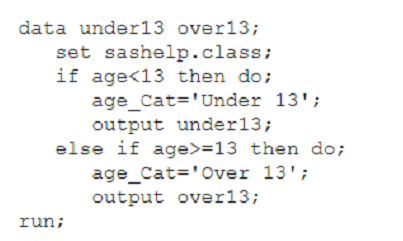
Why does the execution fail?
Which ODS EXCEL statement correctly creates an Excel workbook using the ANALYSIS style?
The correct syntax for creating an Excel workbook using the ODS (Output Delivery System) Excel destination with a specific style is provided by option D. The syntax is as follows: ods excel file='c:\report.xlsx' style=analysis; This statement instructs SAS to output the results of subsequent procedures to an Excel workbook located at c:\report.xlsx, applying the ANALYSIS style to the output. The file= option specifies the path and name of the Excel file to be created or overwritten, and the style= option indicates the style template to be used for the output. The ANALYSIS style is one of the predefined styles that can be applied to the output to control the appearance of tables and graphs. Other options like A) and B) are incorrect due to syntax errors and misplacement of keywords. Option C) has a typo in the file path and incorrect syntax usage. Reference: SAS 9.4 Output Delivery System: User's Guide.
You submit a program and the SAS log is shown below:
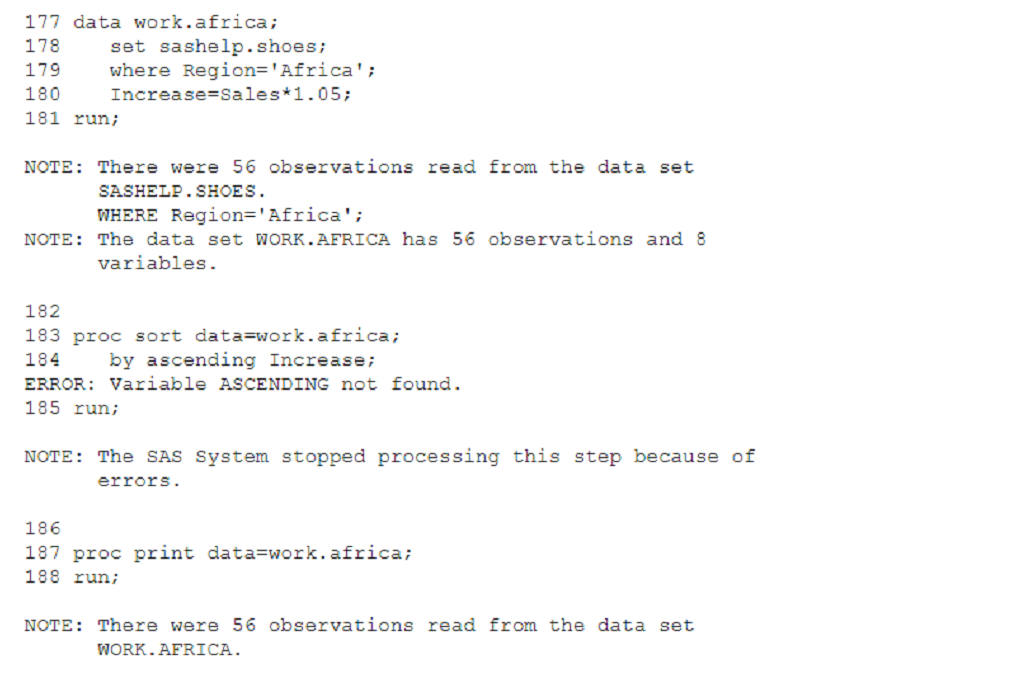
Which statement is true regarding the submitted program?
The correct answer is C. The DATA step and PROC PRINT steps ran without errors. In the SAS log shown, there is a clear error in the PROC SORT step because of the use of an incorrect option by ascending Increase which caused the 'Variable ASCENDING not found' error. However, the DATA step completed successfully, as indicated by the 'NOTE' that follows it, confirming that 56 observations were read from the SASHELP.SHOES data set where Region is Africa. Additionally, the PROC PRINT step also completed successfully, indicated by the 'NOTE' at the bottom of the log which confirms that 56 observations were read from the WORK.AFRICA data set, implying the PROC PRINT step executed without issue.
A is incorrect because the error in PROC SORT did not cause the program to stop; SAS continued processing the next steps. B is incorrect because the PROC SORT step did not run successfully. D is incorrect because the PROC PRINT step did not fail; it ran successfully.
SAS documentation on error messages.
Understanding the SAS log and error messages.
Which PROC MEANS statements specifies variables to group the data before calculating statistics?
In the context of the PROC MEANS procedure in SAS, the CLASS statement is used to specify categorical variables whose unique values group the data before calculating statistics. This allows PROC MEANS to calculate statistics like the mean, sum, or standard deviation for each class or group of data defined by the CLASS variables.
The CLASS statement works as follows:
class variable-list; specifies one or more variables to define groups for analysis.
When used, PROC MEANS computes the requested statistics for each level of the variables listed, which can be very helpful for analyzing how groups compare across different statistics.
The other options are not used in the PROC MEANS procedure to specify grouping of data:
B . GROUP is not a valid statement in PROC MEANS.
C . SUMBY is not a valid statement in SAS.
D . VAR is used in PROC MEANS to specify the analysis variables for which statistics are to be computed, not to group the data.
- Select Question Types you want
- Set your Desired Pass Percentage
- Allocate Time (Hours : Minutes)
- Create Multiple Practice tests with Limited Questions
- Customer Support
Lisa Carter
26 days agoRichard Thompson
1 month agoMichelle Clark
2 months agoHeather Bell
2 months agoJason Reed
3 months agoEric Phillips
4 months agoOlivia Parker
4 months agoEdward Young
5 months agoCharles Flores
5 months agoMaria Davis
5 months agoLinda Lee
6 months agoOlivia Edwards
5 months agoSandra Johnson
5 months agoMelissa Lewis
5 months agoDonald White
6 months agoNathan Anderson
6 months agoLizbeth
6 months agoTesha
7 months agoMarnie
7 months agoFiliberto
7 months agoShelba
7 months agoLeanora
8 months agoRonald
8 months agoJeannetta
8 months agoLawrence
9 months agoCarin
9 months agoPok
9 months agoDaniel
9 months agoLisbeth
10 months agoShantell
10 months agoKizzy
10 months agoAdelina
10 months agoWilda
11 months agoLeonora
11 months agoAhmed
11 months agoJudy
11 months agoKandis
12 months agoSunny
12 months agoTawny
1 year agoKayleigh
1 year agoLevi
1 year agoCaprice
1 year agoDean
1 year agoVeronica
1 year agoBarabara
1 year agoVallie
1 year agoValentin
1 year agoBrittani
1 year agoRegenia
1 year agoZita
1 year agoCarissa
1 year agoPilar
1 year agoPage
1 year agoStephaine
1 year agoTasia
2 years agoZona
2 years agoGraciela
2 years agoStefania
2 years agoJina
2 years agoShawna
2 years agoKimi
2 years agoBronwyn
2 years agoAdelina
2 years agoTambra
2 years agoAnglea
2 years agoLavera
2 years agoArlette
2 years agoJules
2 years agoSherell
2 years agoLigia
2 years agoLouvenia
2 years agoRoosevelt
2 years agoVannessa
2 years agoFlorinda
2 years agoLemuel
2 years agoBeatriz
2 years agoCathern
2 years agoLindsey
2 years agoSarah
2 years agoNobuko
2 years agoMaryann
2 years agoTwana
2 years agoJolanda
2 years agoNina
2 years agoGladys
2 years agoDalene
2 years agoZita
2 years agoTalia
2 years agoPilar
2 years ago