
Free Preparation Discussions
 MENU
MENU
Salesforce Certified MuleSoft Developer (Mule-Dev-201) Exam Questions
- Salesforce Developer Certifications
- Salesforce MuleSoft Developer I Certifications
- Topic 1: Creating Application Networks: The topic of creating Application Networks encompasses understanding MuleSoft’s proposal for closing the IT delivery gap and describing the role and characteristics of the modern API. It also includes the purpose and roles of a Center for Enablement (C4E), and the benefits of API-led.
- Topic 2: Designing APIs: Designing APIs involves describing the lifecycle of the modern API and using RAML to define various aspects of an API. It includes identifying when to use query parameters vs URI parameters, and defining API parameters.
- Topic 3: Accessing and Modifying Mule Events: It describes the Mule event data structure. Moreover, the topic focuses on usage of transformers and enriching Mule events.
- Topic 4: Structuring Mule Applications: Structuring Mule applications covers parameterizing an application and defining and reusing global configurations. It includes breaking an application into multiple flows using private flows, subflows, and the Flow Reference component.
- Topic 5: Building API Implementation Interfaces: This topic involves manually creating a RESTful interface for a Mule application and generating a REST Connector from a RAML specification. It also includes describing the features and benefits of APIkit.
- Topic 6: Using Connectors: It focuses on retrieving data from REST services using HTTP Request or REST Connector. Moreover, the topic covers using a Web Service Consumer connector for SOAP web services and the Transform Message component.
- Topic 7: Processing Records: Processing records includes methods for processing individual records in a collection and explaining how Mule events are processed by the For Each scope. It also involves using the Batch Job with Batch Steps and a Batch Aggregator.
- Topic 8: Transforming Data with DataWeave: It involves writing DataWeave scripts and using DataWeave functions. This topic also includes defining and using DataWeave variables, functions, and modules, and applying correct syntax.
- Topic 9: Routing Events: It focuses on using the Choice router for conditional logic and the Scatter-Gather router to multicast events. This topic also involves validating data by using the Validation module.
- Topic 10: Handling Errors: Handling errors includes describing default error handling in Mule applications and defining custom global default error handlers. It involves comparing On Error Continue and On Error Propagate scopes, creating error handlers for a flow, using the Try scope, and mapping errors to custom application errors.
- Topic 11: Debugging and Troubleshooting Mule Applications: Using breakpoints to inspect a Mule event during runtime, installing missing Maven dependencies, and reading and deciphering Mule log error messages are sub-topics of this topic.
- Topic 12: Deploying and Managing APIs and Integrations: It includes packaging Mule applications for deployment and deploying them to CloudHub. This topic also involves using CloudHub properties, creating and deploying API proxies, connecting an API implementation to API Manager, and applying policies to secure an API.
Free Salesforce Salesforce Certified MuleSoft Developer (Mule-Dev-201) Exam Actual Questions
Note: Premium Questions for Salesforce Certified MuleSoft Developer (Mule-Dev-201) were last updated On Oct. 06, 2026 (see below)
Refer to the exhibits.
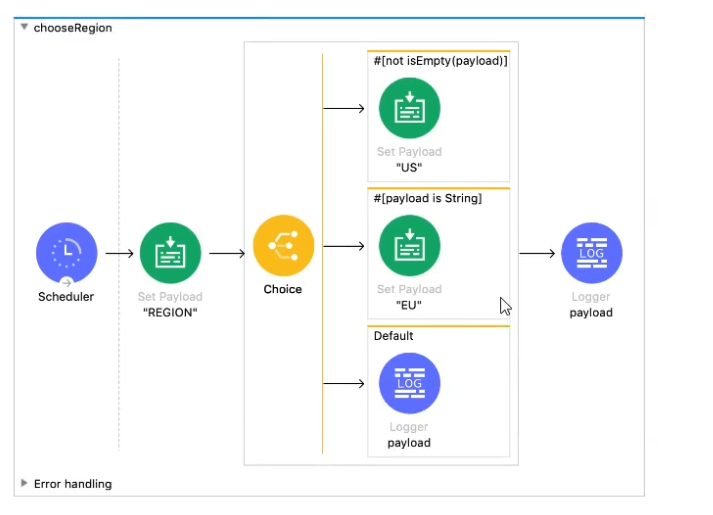
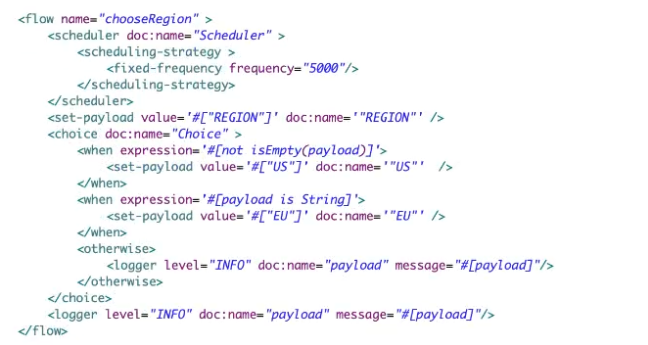
A Mule application contains a Choice router. What is logged when the flow completes?
Refer to the exhibit.
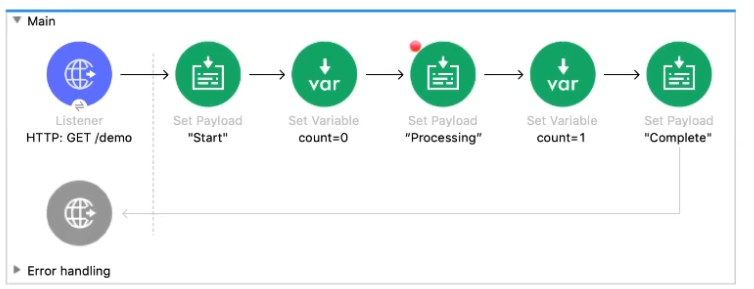
The Mule application Is debugged in Any point Studio and stops at the breakpoint What is the value of the payload displayed In the debugger at this breakpoint?
What is the difference between a subflow and a sync flow?
Correct answer is Subflow has no error handling implementation where as sync flow has.
Subflow
A subflow processes messages synchronously (relative to the flow that triggered its execution) and always inherits both the processing strategy and exception strategy employed by the triggering flow. While a subflow is running, processing on the triggering flow pauses, then resumes only after the subflow completes its processing and hands the message back to the triggering flow.
Synchronous Flow
A synchronous flow, like a subflow, processes messages synchronously (relative to the flow that triggered its execution). While a synchronous flow is running, processing on the triggering flow pauses, then resumes only after the synchronous flow completes its processing and hands the message back to the triggering flow. However, unlike a subflow, this type of flow does not inherit processing or exception strategies from the triggering flow.
This type of flow processes messages along a single thread, which is ideally suited to transactional processing
Pick the component with which DataWeave is tightly integrated.
Correct answer is Mule runtime
DataWeave is the MuleSoft expression language for accessing and transforming data that travels through a Mule app. DataWeave is tightly integrated with the Mule runtime engine, which runs the scripts and expressions in your Mule app.
Mule Doc Reference : https://docs.mulesoft.com/mule-runtime/4.3/dataweave
Refer to the exhibits. A web client submits a request to http://localhost:8081/fliqhts?destination=SFO and the Web Service Consumer throws a WSC:BAD_REQUEST error.
What is the next step to fix this error?
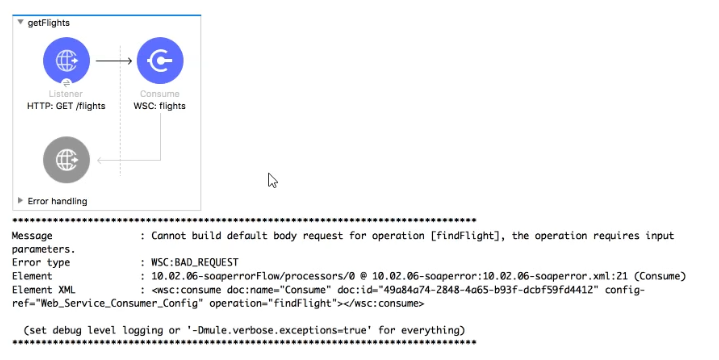
As can be seen in error message , SOAP service findFlights expects the SOAP paylaod. This can be set using transform message processor which forms SOAP payload before the Consume operation that contains the destination query parameter
- Select Question Types you want
- Set your Desired Pass Percentage
- Allocate Time (Hours : Minutes)
- Create Multiple Practice tests with Limited Questions
- Customer Support
Ryan Morgan
13 days agoHarold Flores
1 month agoJason Anderson
1 month agoMark Thomas
2 months agoBetty Perez
2 months agoMatthew Morgan
3 months agoElizabeth Cook
4 months agoDennis Smith
4 months agoCharles Williams
5 months agoCharles Nguyen
5 months agoMichelle Rodriguez
6 months agoAnthony Cook
5 months agoSarah Allen
6 months agoJason Edwards
5 months agoNancy Anderson
5 months agoStephanie Reed
6 months agoShizue
6 months agoNydia
7 months agoReena
7 months agoCristy
7 months agoYuki
7 months agoIzetta
8 months agoStefan
8 months agoWilford
8 months agoMartin
9 months agoBrock
9 months agoVinnie
9 months agoWynell
9 months agoLashaun
10 months agoDomonique
10 months agoMona
10 months agoJesus
10 months agoMaira
11 months agoReena
11 months agoGerald
11 months agoCarman
11 months agoCarey
12 months agoIrma
12 months agoCheryll
1 year agoBlythe
1 year agoJannette
1 year agoYolande
1 year agoCherelle
1 year agoRocco
1 year agoCarmen
1 year agoCassi
1 year agoAnnelle
1 year agoDorothy
1 year agoLera
1 year agoNovella
1 year agoLuisa
1 year agoSanjuana
1 year agoCeola
1 year agoLorita
1 year agoMicaela
2 years agoAileen
2 years agoAlishia
2 years agoDustin
2 years agoJoesph
2 years agoHobert
2 years agoArleen
2 years agoDelisa
2 years agoLashaunda
2 years agoTheron
2 years agoElsa
2 years agoFelicia
2 years agoMargret
2 years agoBerry
2 years agoLarue
2 years agoWai
2 years agoKatlyn
2 years agoWhitley
2 years agoAlline
2 years agoJolene
2 years agoElinore
2 years agoEvette
2 years agoLeatha
2 years agoRene
2 years agoLindsey
2 years agoAnnmarie
2 years agoGayla
2 years agoAron
2 years agoErick
2 years agoYuki
2 years agoJeannetta
2 years agoHeike
2 years agoMollie
2 years agoBenton
2 years agoDelmy
2 years agoBette
2 years agoLang
2 years agoMarget
2 years agoCeola
2 years agoDelisa
2 years agoParis
2 years ago