
Free Preparation Discussions
 MENU
MENU
Palo Alto Networks NetSec-Analyst Exam Questions
- Topic 1: Object Configuration Creation and Application: This section of the exam measures the skills of Network Security Analysts and covers the creation, configuration, and application of objects used across security environments. It focuses on building and applying various security profiles, decryption profiles, custom objects, external dynamic lists, and log forwarding profiles. Candidates are expected to understand how data security, IoT security, DoS protection, and SD-WAN profiles integrate into firewall operations. The objective of this domain is to ensure analysts can configure the foundational elements required to protect and optimize network security using Strata Cloud Manager.
- Topic 2: Policy Creation and Application: This section of the exam measures the abilities of Firewall Administrators and focuses on creating and applying different types of policies essential to secure and manage traffic. The domain includes security policies incorporating App-ID, User-ID, and Content-ID, as well as NAT, decryption, application override, and policy-based forwarding policies. It also covers SD-WAN routing and SLA policies that influence how traffic flows across distributed environments. The section ensures professionals can design and implement policy structures that support secure, efficient network operations.
- Topic 3: Management and Operations: This section of the exam measures the skills of Security Operations Professionals and covers the use of centralized management tools to maintain and monitor firewall environments. It focuses on Strata Cloud Manager, folders, snippets, automations, variables, and logging services. Candidates are also tested on using Command Center, Activity Insights, Policy Optimizer, Log Viewer, and incident-handling tools to analyze security data and improve the organization overall security posture. The goal is to validate competence in managing day-to-day firewall operations and responding to alerts effectively.
- Topic 4: Troubleshooting: This section of the exam measures the skills of Technical Support Analysts and covers the identification and resolution of configuration and operational issues. It includes troubleshooting misconfigurations, runtime errors, commit and push issues, device health concerns, and resource usage problems. This domain ensures candidates can analyze failures across management systems and on-device functions, enabling them to maintain a stable and reliable security infrastructure.
Free Palo Alto Networks NetSec-Analyst Exam Actual Questions
Note: Premium Questions for NetSec-Analyst were last updated On Oct. 04, 2026 (see below)
An analyst needs to prevent users from downloading executable files from "High-Risk" URL categories while allowing them from "Business-and-Economy." Which profile should be configured to achieve this specific file-type restriction?
Comprehensive and Detailed 150 to 250 words of Explanation From Palo Alto Networks Network Security Analyst Knowledge:
The File Blocking Profile is the primary tool used by Palo Alto Networks firewalls to control the movement of specific file types across the network. While a URL Filtering Profile (Option A) can block access to a website based on its category, it does not have the granular ability to distinguish between a PDF download and an EXE download on that site.
To meet the requirement, the analyst creates a File Blocking Profile with rules that target the .exe file extension. The profile allows the analyst to set actions like alert, block, or continue based on the direction of the traffic (upload or download) and the application being used. By attaching this profile to a Security policy rule, the firewall uses Content-ID to look deep into the payload---beyond just the file extension---to identify the true file type. This prevents users from bypassing security by simply renaming a malicious .exe file to .txt. This is a core objective for ensuring that sanctioned web browsing does not become a vector for malware delivery.
A firewall administrator implementing Palo Alto Networks best practices on the company firewall reviews NGFW alerts in Strata Cloud Manager (SCM) and determines that one alert does not apply to this environment. If the administrator has no intention to resolve the underlying issue, what is the appropriate next step?
Comprehensive and Detailed 150 to 250 words of Explanation From Palo Alto Networks Network Security Analyst Knowledge:
Within the Strata Cloud Manager (SCM) interface, managing the lifecycle of incidents and alerts is a core responsibility. When an administrator encounters an NGFW alert that is deemed irrelevant or inapplicable to their specific environment, SCM provides a mechanism to silence that alert to reduce 'alert fatigue' and keep the dashboard focused on actionable items.
The appropriate action in this scenario is to Open the NGFW alert and click ''Suppress'' under ''Actions''. Suppression allows the administrator to mute specific incidents or alerts that they do not intend to remediate, effectively acknowledging the risk but choosing to ignore it in the reporting and notification workflows. This is often used for non-critical alerts or during maintenance windows. Unlike dismissing or changing priorities, Suppression is a formal administrative action within the SCM incident framework that can be granularly controlled, allowing for custom raise and clear conditions to be overridden based on the organization's unique operational needs. This ensures that the 'Health Score' or 'Security Posture' metrics are not unfairly penalized by known, accepted environmental conditions.
What are two valid pattern types in a Data Filtering profile? (Choose two.)
Comprehensive and Detailed 150 to 250 words of Explanation From Palo Alto Networks Network Security Analyst Knowledge:
In the Palo Alto Networks ecosystem, specifically when utilizing Strata Cloud Manager (SCM) and Enterprise Data Loss Prevention (DLP), Data Filtering profiles are used to identify and protect sensitive information. When an analyst creates a custom data pattern to be used within these profiles, the system allows for two primary methods of identification: Regular Expressions (Regex) and File Properties.
Regular Expressions (D) allow the analyst to define a specific string or numerical pattern, such as a custom employee ID format or a proprietary project code. This is the most flexible and common way to catch sensitive text data within a file or data stream.
File Properties (C) allow the analyst to create patterns based on the metadata or attributes of a file rather than its contents. This includes identifying files based on the 'Author,' 'Title,' 'Company,' or even custom tags embedded in document properties (e.g., Microsoft Word or PDF metadata). By combining these two pattern types, a Network Security Analyst can create a highly granular detection engine. For instance, a policy could block any file where the 'Company' property is set to a competitor or any file containing text that matches a specific Regex-defined sensitive data format.
While 'Predefined' patterns (like Credit Card numbers) are also a core component, they are not listed as an option here. 'Proximity Patterns' are a feature used to reduce false positives by ensuring two patterns appear near each other, but the fundamental 'pattern types' for custom definitions are Regex and File Properties.
Based on the image below, what is a risk associated with this configuration?
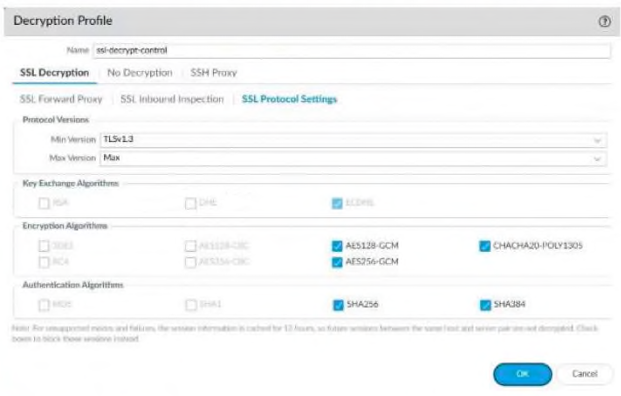
Comprehensive and Detailed 150 to 250 words of Explanation From Palo Alto Networks Network Security Analyst Knowledge:
In the provided image, the Decryption Profile is configured with a Min Version of TLSv1.3. While this represents a high security posture, it introduces a significant operational risk: compatibility issues with legacy applications or clients.
Many older operating systems, web browsers, and legacy internal applications do not support TLS 1.3. If a client or server attempts to negotiate a connection using an older, unsupported protocol version (such as TLS 1.2 or 1.1), the firewall will drop the connection because it falls below the configured minimum threshold. A Network Security Analyst must balance the need for modern encryption with the functional requirements of the network.
Option C is incorrect because disabling weak algorithms like 3DES and RC4 actually improves the security posture. Option D is incorrect because the firewall is fully capable of decrypting traffic using Perfect Forward Secrecy (PFS) if the appropriate certificates are installed. Option B is a general concern for all decryption but is not a specific risk of the versioning shown. Therefore, the most immediate risk of setting the minimum version to TLS 1.3 is the potential disruption of services for any user or system still relying on the widely-used TLS 1.2 protocol or older.
A user reports that they are being blocked from a website with a "Certificate Error." Which log will help the analyst determine if the firewall is blocking the session because the web server is using an expired certificate?
Comprehensive and Detailed 150 to 250 words of Explanation From Palo Alto Networks Network Security Analyst Knowledge:
When a firewall is performing SSL/TLS decryption, it acts as a proxy for the encrypted connection. If the firewall encounters an issue with the destination server's certificate---such as an expiration, an untrusted issuer, or a mismatch---the Decryption Log is the specific resource for troubleshooting.
The Decryption Log provides detailed information about why a decrypted session was failed or blocked. It explicitly lists the 'Error' or 'Reason' for the failure, such as expired-certificate or untrusted-issuer. While the Traffic Log (Option A) might show a 'deny' or 'reset' action, it will not provide the specific certificate details. By checking the Decryption Log, the analyst can confirm if the issue is a security problem with the external site or if the firewall's decryption profile needs to be adjusted to allow the connection (e.g., if it is a trusted internal site with a self-signed certificate).
- Select Question Types you want
- Set your Desired Pass Percentage
- Allocate Time (Hours : Minutes)
- Create Multiple Practice tests with Limited Questions
- Customer Support
Jeffrey Campbell
14 days agoBrian Lewis
1 month agoElizabeth Allen
2 months agoMark Campbell
2 months agoAmanda Harris
3 months agoElizabeth Johnson
3 months agoCarol Hill
4 months agoAngela Williams
4 months agoAnthony Edwards
5 months agoNancy Parker
5 months agoOlivia Allen
18 days agoElizabeth Peterson
6 months agoElizabeth Morgan
5 months agoNancy Allen
5 months agoAndrew Garcia
5 months agoTimothy Morris
5 months agoAmanda Harris
5 months agoMitsue
6 months agoJani
6 months agoCorrie
7 months agoThomasena
7 months agoPaulene
7 months agoThea
7 months agoSean
8 months agoCherrie
8 months agoChantay
8 months agoOwen
8 months agoCarmelina
9 months agoPedro
9 months agoStephaine
9 months agoRonnie
9 months agoCorinne
10 months agoFrancine
10 months agoAn
10 months agoTrevor
10 months agoRasheeda
11 months agoCeleste
11 months agoLigia
11 months ago